
As a WooCommerce store owner, running promotions is part of your daily growth strategy. But here’s a hard truth many professionals eventually realize: Most WooCommerce promotions fail not because of bad discounts, but because they’re too broad.
Imagine: You apply one coupon to everyone. You discount all regions, even where sales are already strong. You give the same deal to high-cost shipping zones as to local buyers. And suddenly, your profit margin shrinks without the strategic boost you expected.
You have to recognize that your customers don’t all behave the same way, especially across different locations. But WooCommerce’s default coupon system treats them all the same.
And that’s exactly the gap we’ll fix in this guide.
In this article, you’ll learn how to create restricted WooCommerce discount coupons based on location rules using YayPricing, in a clear, friendly, and practical way, so your promotions finally match how global customers actually shop.
Why Location-Based Discounts Work So Well?
Location is one of the most practical targeting rules you can use in WooCommerce, yet it’s often ignored.
When you apply discounts based on customer location, you gain the ability to:
- Offset high shipping costs for specific regions
- Run country-specific or regional campaigns
- Reward local customers without affecting global pricing
- Test promotions in new markets safely
- Avoid unnecessary discounts where sales are already strong
Unfortunately, WooCommerce’s built-in coupon settings don’t allow conditions based on country, state, or city. You can limit coupons by product or category, but not by customer location.
That limitation is exactly why many WooCommerce professionals turn to YayPricing.
YayPricing: Control Discounts Based on Real Shopping Conditions
If this is your first time hearing about YayPricing, here’s the short version.
YayPricing is a WooCommerce pricing and discount plugin designed for store owners who want to run rule-based promotions without dealing with complex logic or custom code.
Instead of static coupons, YayPricing lets you create dynamic discounts based on conditions such as:
- Products and cart value
- Quantity rules
- User roles
- Time schedules
- Customer location
Everything is handled through a visual rule builder, so you always understand:
- When a discount applies
- Who qualifies
- Why it triggered
This makes it much easier to move from broad, risky promotions to strategic, location-aware campaigns.
Step-by-Step Guide: Restrict WooCommerce Coupons by Location Rule
Step 1: Install and Activate YayPricing
Start by installing and activating the Pro version of YayPricing, which allows WordPress users to unlock advanced conditional rules, including location-based targeting.
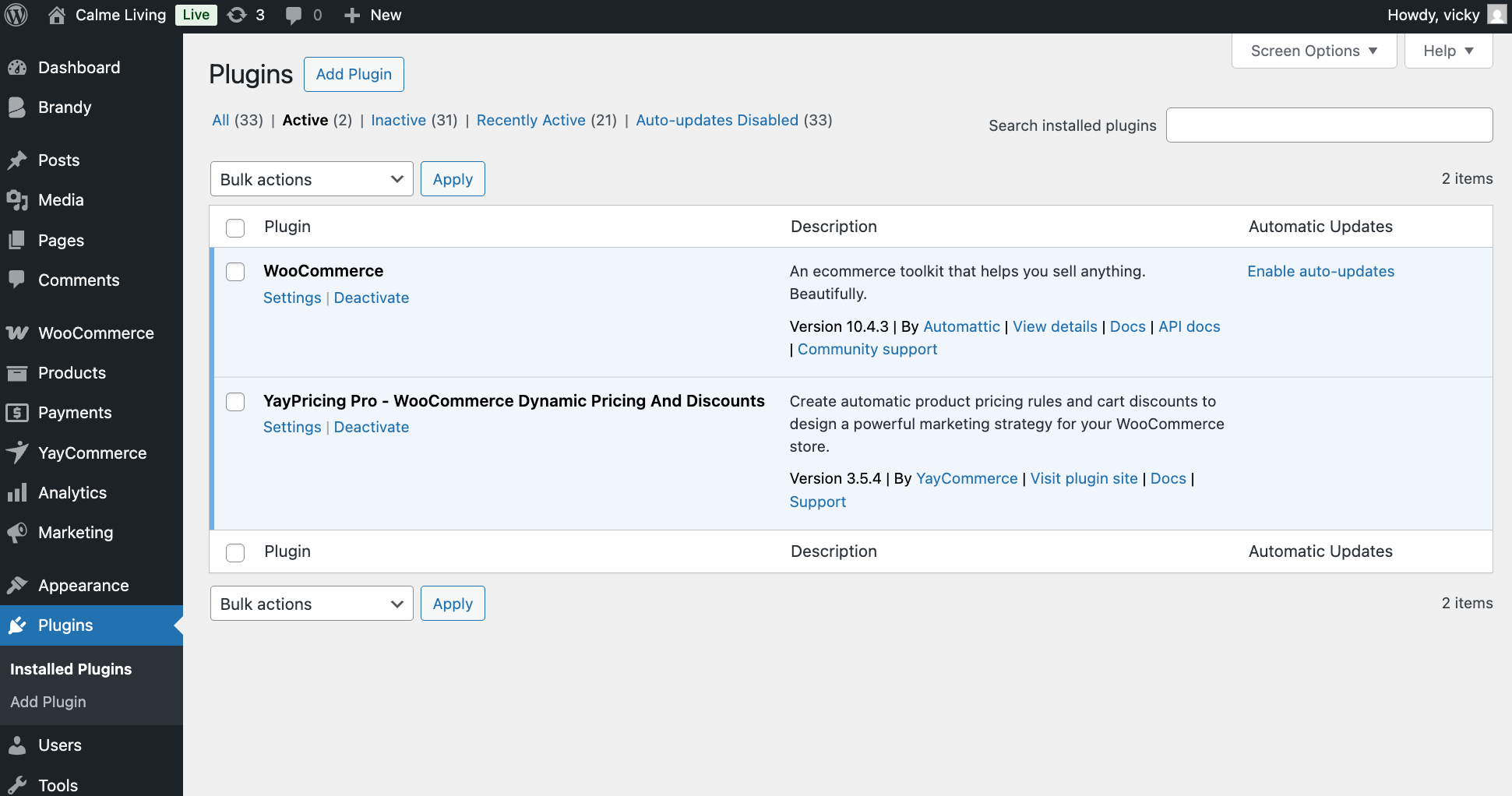
After activation, you’ll find YayPricing listed under the WooCommerce menu in your WordPress dashboard.
Step 2: Create a Pricing Rule Linked to a Coupon
Next, go to WooCommerce > YayPricing and create a new pricing rule. For this example, let’s run the campaign: “15% OFF for customers located in the United States when customers apply our Coupon Code.”
If you’ve already created a WooCommerce coupon with a discount value set to 0, you can reuse it here. YayPricing will handle the actual discount logic.
We’ll configure the new rule and set the discount amount as 15%.
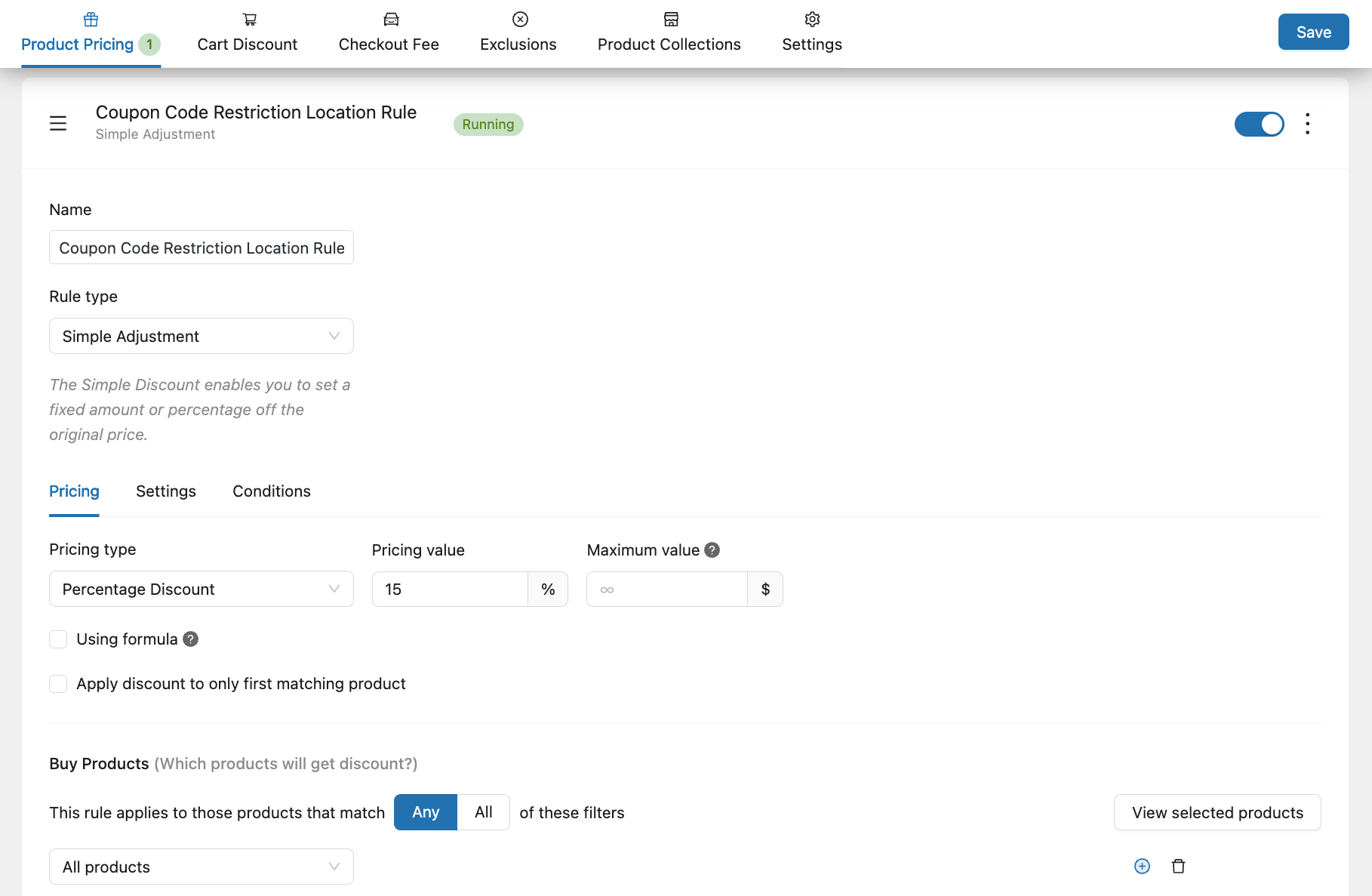
Next step, you will slide to the condition tab to assign the rule to your existing coupon code.
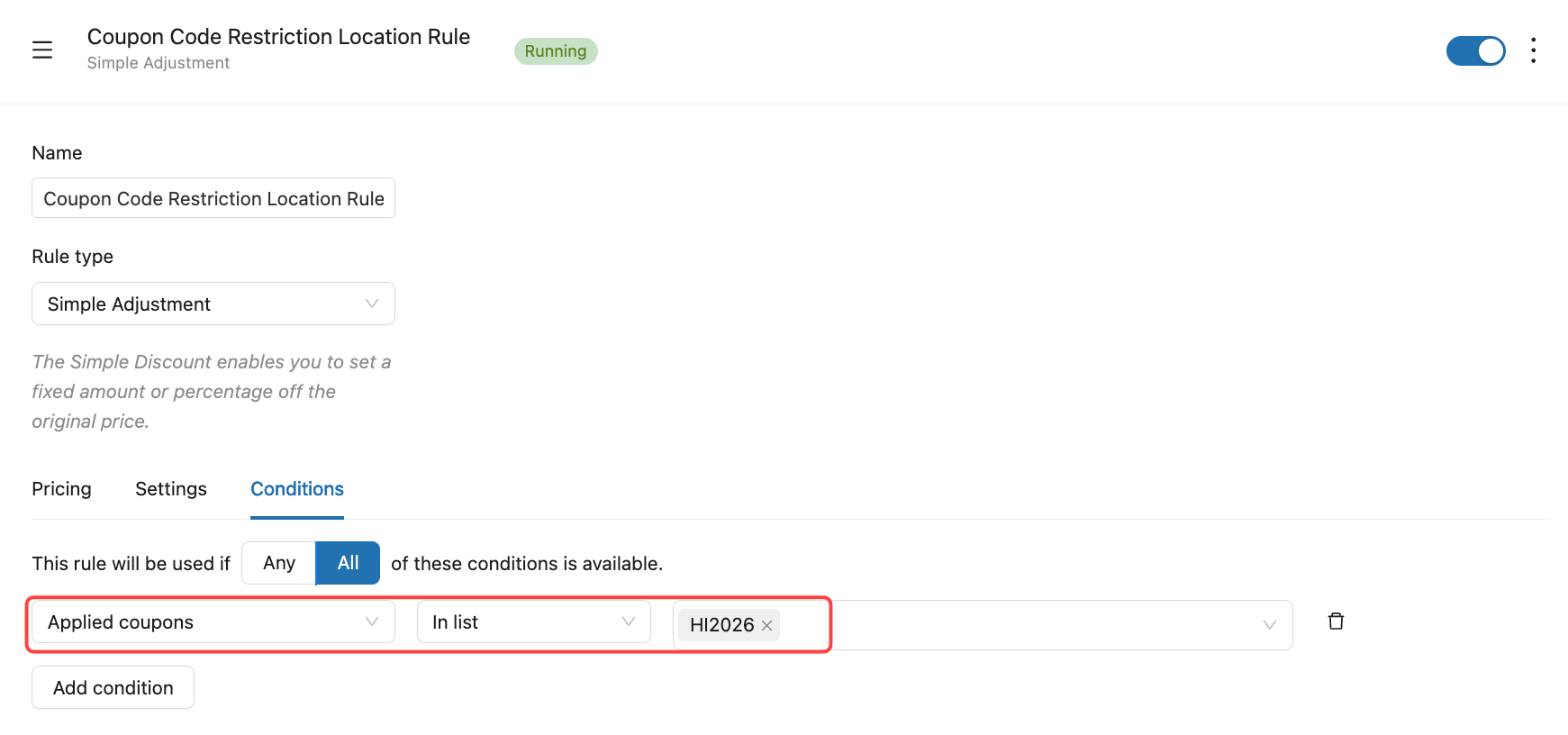
This approach keeps your coupon system clean while giving you full control over when it applies.
Step 3: Define the Location Rule
Continue on the condition tab, YayPricing allows you to restrict discounts based on Shipping region, such as Customer country, States or Province.
Once this rule is active, the discount will only apply if the customer’s billing or shipping address matches the selected location.
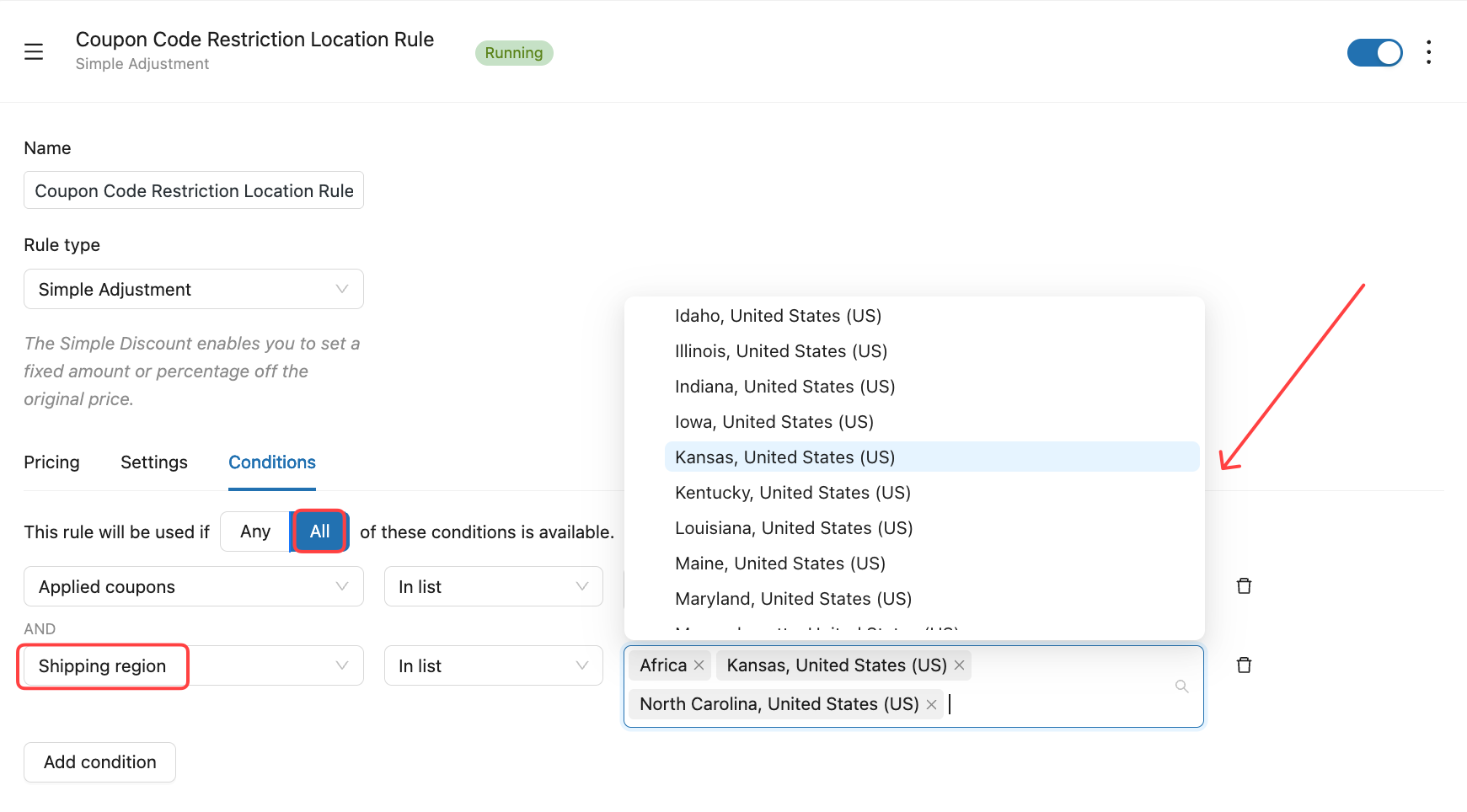
Save the rule, and your location-based coupon is ready.
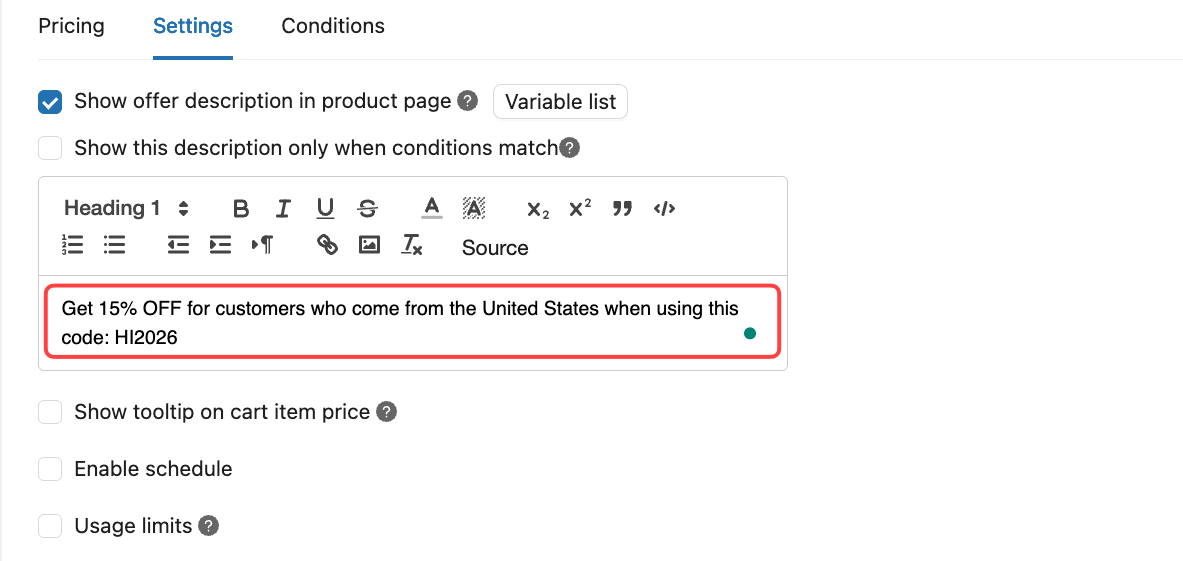
Step 4: Make the Promotion Clear to Customers
As we know, a discount works best when customers understand it immediately.
With YayPricing, this plugin supports WooCommerce store owners to:
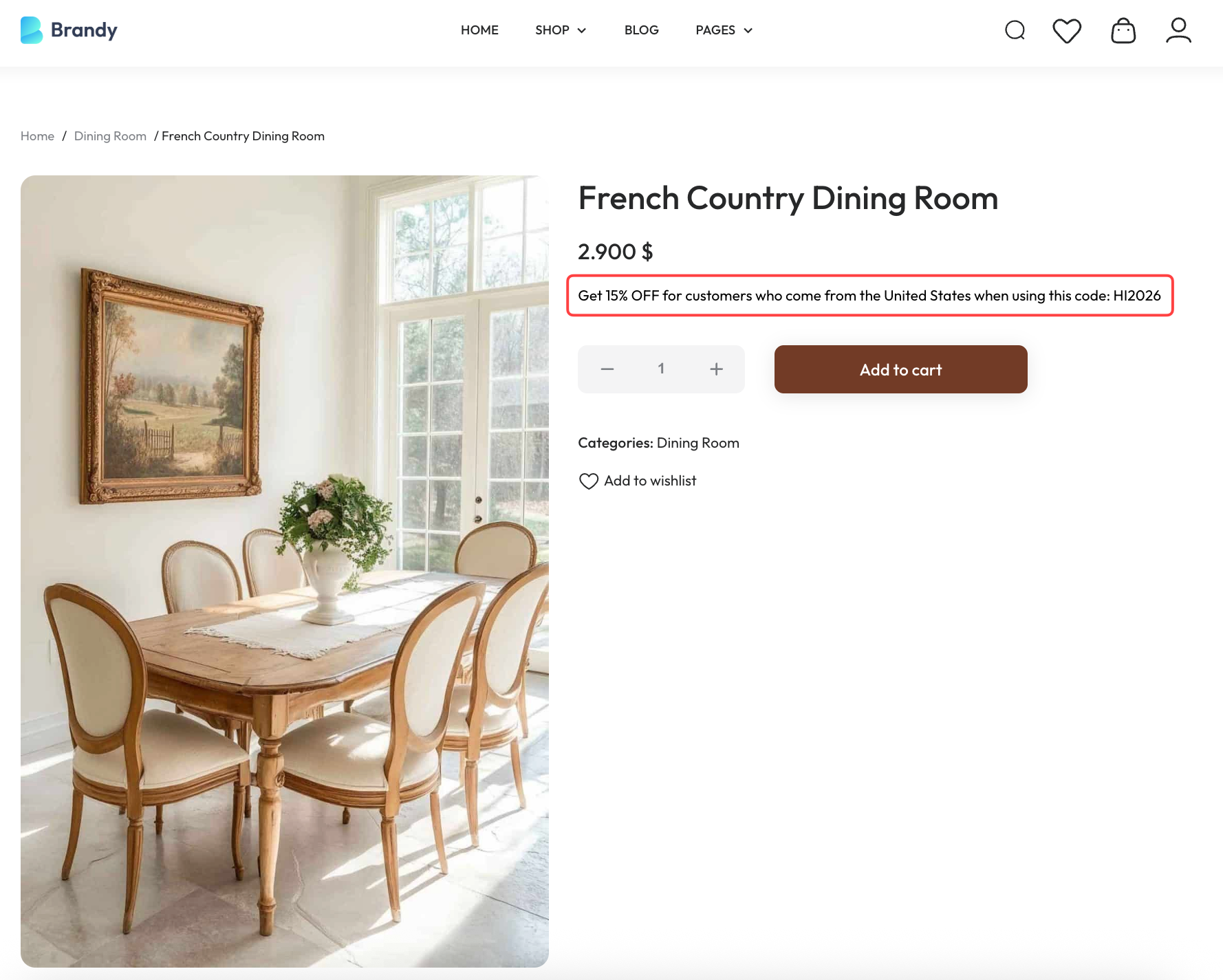
- Display discount description on product pages
- Automatically update prices in the cart
- Highlight eligible items with sale badges
- Apply the coupon only when conditions are met
This avoids confusion, reduces support questions, and builds trust – especially for international shoppers who may not qualify.
Step 5: Test the Customer Experience
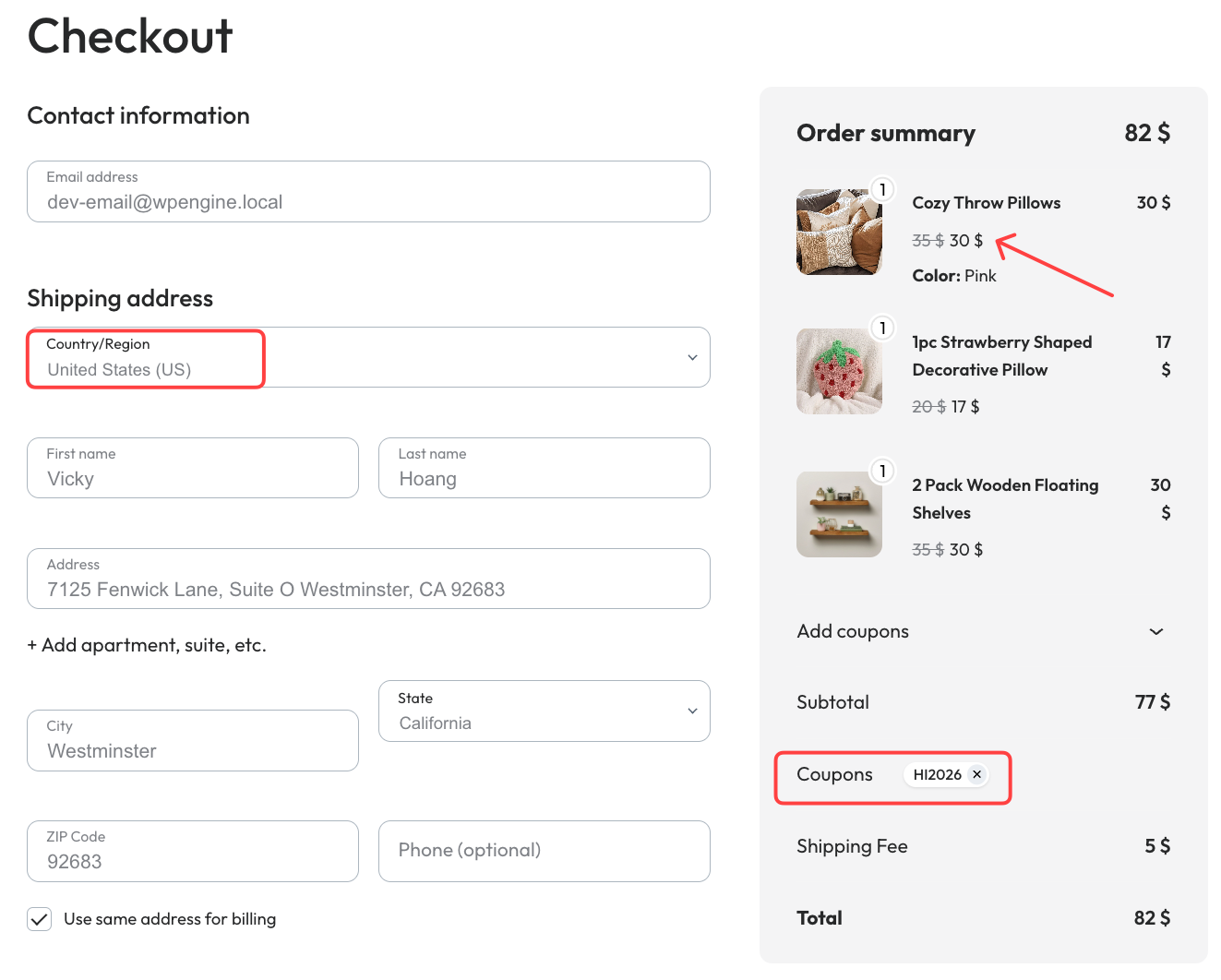
Once you’re satisfied with all the settings, make sure the rule works well on your WooCommerce store. So we have to make a test purchase as a customer: add a random product, enter the shipping information, then enter the code to get the discount.
Frequently Asked Questions
- Can WooCommerce restrict coupons by location without plugins?
No. WooCommerce does not support location-based coupon conditions by default. To target customers by country, state, or city, you need a plugin like YayPricing.
- Which address does YayPricing use for location rules?
YayPricing relies on the customer’s billing or shipping address, depending on your WooCommerce configuration, to determine eligibility.
- Will customers outside the location be able to see the coupon?
They can enter the coupon code, but the discount will only apply if all conditions, including location, are met.
Running regional or country-specific promotions doesn’t have to be complicated.
With YayPricing, you can target the right customers in the right locations, protect your margins, and run flexible campaigns that actually convert.
Start Creating Location-Based Discounts with YayPricing
If you’re exploring advanced discount strategies, these related guides will help you build even more effective WooCommerce campaigns:
- How to Set Up Restricted WooCommerce Discount Coupons Based on Advanced Quantity
- How to Create Product-Based Shipping Rules in WooCommerce
- How to Set Up WooCommerce Custom Price Based on User Input
Looking to level up your WooCommerce discount strategy? These YayCommerce resources are a great next step: YouTube, Facebook. Whether you’re a beginner or an experienced store owner, these resources will help you get more value from your WooCommerce setup.
Final Thoughts
If there’s one thing we’ve learned from working with WooCommerce store owners, it’s this: smarter discounts always outperform bigger discounts.
Location-based coupons aren’t about giving less; they’re about giving intentionally. Instead of running blanket promotions that chip away at your profit, you can now support specific regions, test new markets, or ease shipping costs where it truly matters.
That’s how modern WooCommerce stores grow sustainably.
With YayPricing, you’re no longer stuck with WooCommerce’s basic coupon limits. You get the flexibility to build promotions that match real customer behavior, across countries, states, and regions – all inside a clean, visual rule builder. No custom code. No complicated setup. Just strategic control.
If your store serves international customers (or even multiple regions within one country), this isn’t just a “nice-to-have” feature. It’s a competitive advantage.
Start with one targeted campaign. Track the impact. Refine your strategy.
Small, smart adjustments like this are exactly how successful WooCommerce businesses scale, and that’s what we love helping you do here at NinjaTeam.
