
Do you want to know how to use AI in WordPress 7.0? In this post, we are going to show you what WordPress 7.0 offers in the AI space and how you can use it.
Artificial Intelligence is now built into WordPress 7.0. This major update introduces native AI infrastructure, including AI Connectors, the WP AI Client, and the Abilities API.
These features allow you to connect to AI providers such as OpenAI, Anthropic, and Google directly from your dashboard. With WordPress 7.0, you can generate content, create images, write alt text, and get smart editing suggestions without relying on multiple third-party plugins.
In this guide, you’ll learn how to set up AI in WordPress 7.0 and explore practical use cases that help improve productivity and website performance.
First, let’s see what is new in WordPress 7.0 AI update.
What is New in WordPress 7.0 AI?
WordPress 7.0 marks a major shift by bringing native AI infrastructure directly into the core. Instead of depending entirely on third-party plugins, WordPress now provides built-in tools that make AI integration more standardized, secure, and developer-friendly.
Here are the key AI advancements introduced in WordPress 7.0:
- AI Connectors: A new centralized screen in Settings → Connectors lets you connect your site to AI providers such as OpenAI, Anthropic, and Google from one place. This removes the need to enter API keys in multiple plugins.
- WP AI Client: This new core component enables WordPress and plugins to communicate with AI models in a consistent and provider-agnostic way.
- Abilities API: This API allows plugins and themes to expose their features in a structured format that AI systems can understand. It lays the foundation for future AI agents that can interact with WordPress more intelligently.
- Official WordPress AI Plugin: WordPress now offers an official plugin that brings experimental AI features directly into the block editor, including title generation, excerpt creation, alt text generation, image generation, and content summaries.
- MCP Support: WordPress 7.0 also improves support for the Model Context Protocol (MCP), which helps AI models better understand and work with WordPress data and actions.
These updates do not replace existing AI plugins. Instead, they create a stronger foundation that allows plugins to work more efficiently and securely with AI.
How to Set Up AI in WordPress 7.0 (Step-by-Step)
Setting up AI in WordPress 7.0 is straightforward. Follow these steps to connect your site to AI and start using its features:
Step 1: Update to WordPress 7.0
Make sure your website is running on WordPress 7.0 or higher. You can check your current version by going to Dashboard → Updates.
Step 2: Go to the Connectors Settings
Navigate to Settings → Connectors in your WordPress admin dashboard. This is the new central place where you can connect AI providers.
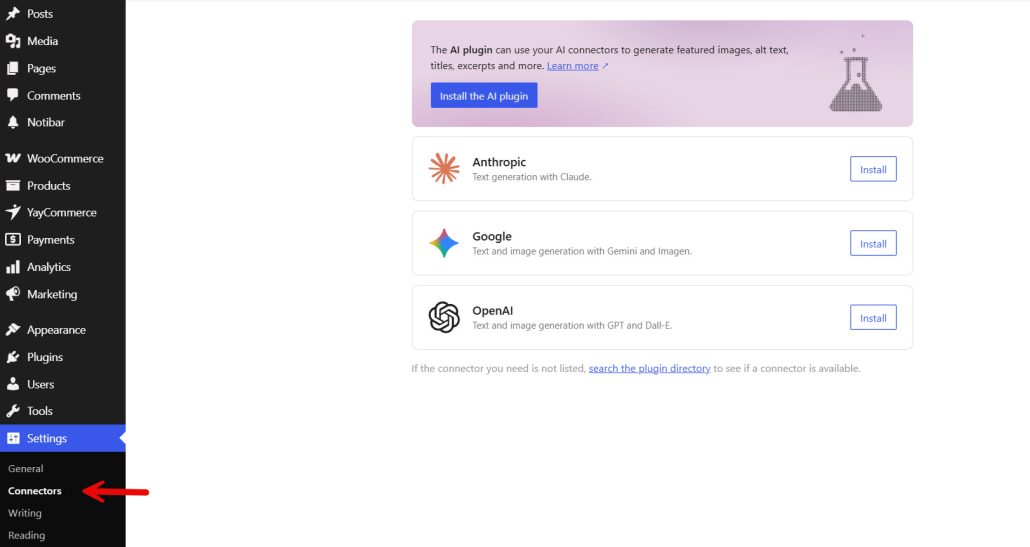
Step 3: Connect an AI Provider
Choose from the available providers:
- OpenAI (ChatGPT)
- Anthropic (Claude)
- Google (Gemini)
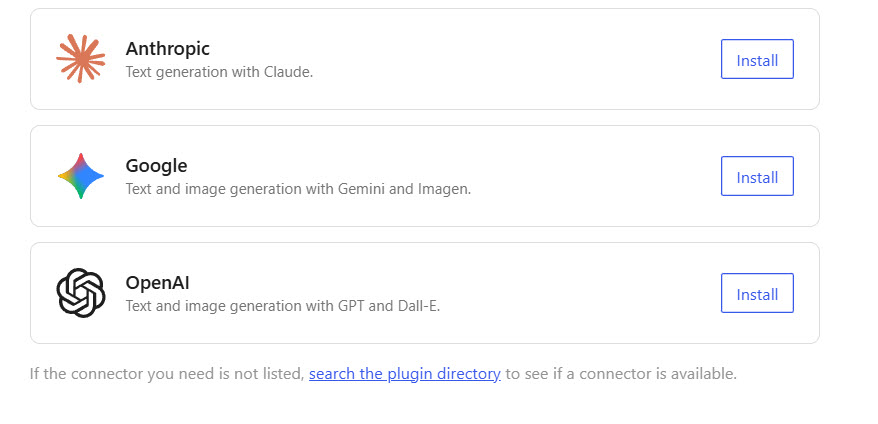
Click on your preferred provider, enter your API key, and save the settings. Once connected, WordPress will validate the key.
Step 4: Install the Official WordPress AI Plugin
Go to Plugins → Add New and search for “WordPress AI”. Install and activate the official plugin developed by the WordPress team.
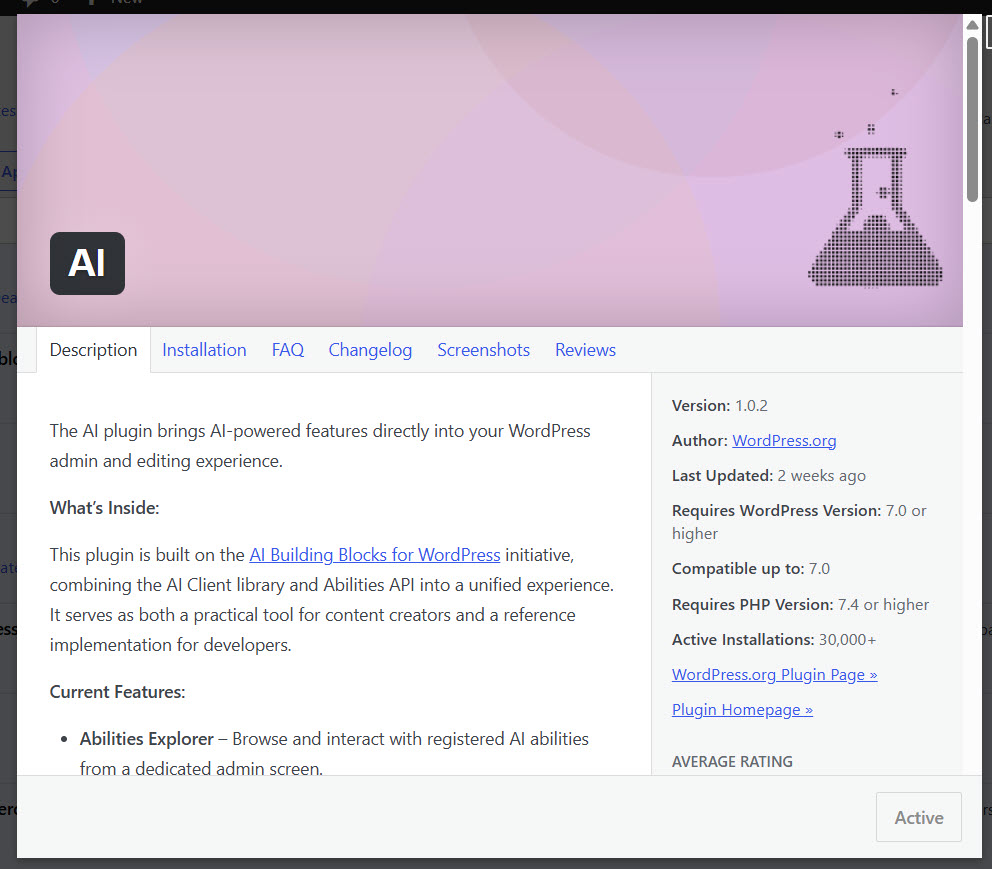
Step 5: Enable AI Features
After activating the plugin, go to Settings → AI. Here you can turn on the AI features you want to use, such as:
- Title generation
- Excerpt generation
- Alt text generation
- Image generation
- Content summarization
You can enable or disable each feature individually.
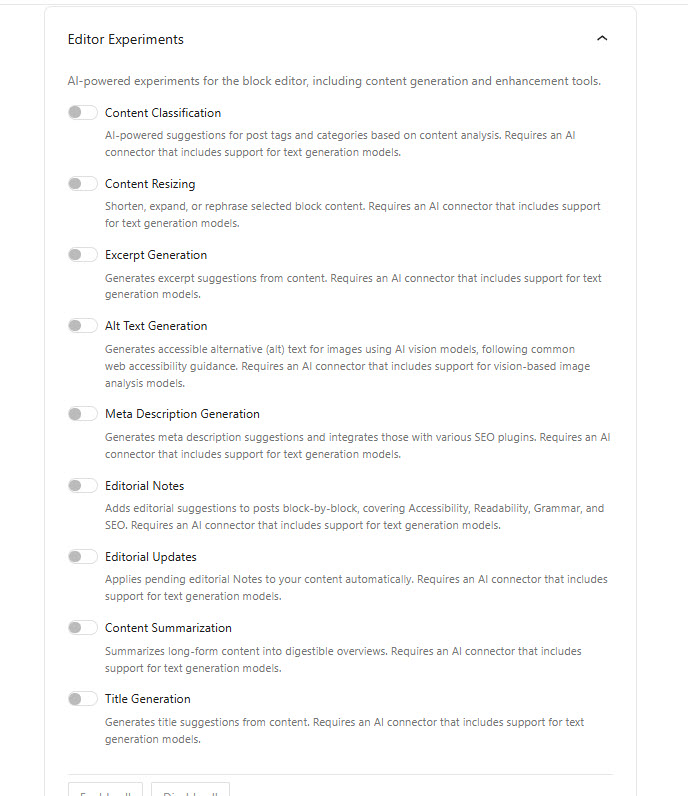
Step 6: Start Using AI in the Editor
Open the Block Editor and create or edit a post. You will see AI options in the toolbar and sidebar, allowing you to generate titles, summaries, alt text, and more with a single click.
Tip: It is recommended to test these features on a staging site first before using them on a live website.
Core AI Features in WordPress 7.0 (What Actually Works)
WordPress 7.0 introduces several AI-powered features through the official WordPress AI plugin. While some features are still experimental, many are already useful for day-to-day tasks. Here are the core AI features currently available:
- Title Generation: AI can suggest multiple title options for your posts and pages based on the content. This helps save time during the writing process.
- Excerpt Generation: Automatically generate post excerpts. This feature is especially useful when publishing multiple articles and wanting consistent, well-written summaries.
- Content Summarization: AI can create short summaries of long articles. This is helpful for adding TL;DR sections or preparing content for newsletters and social media.
- Alt Text Generation: The AI can automatically write descriptive alt text for images. This improves accessibility and supports better image SEO.
- Featured Image Generation: You can generate relevant featured images directly from the block editor using text prompts. This reduces the need to search for stock images.
- Content Rewriting and Improvement: AI can help rewrite sentences, improve clarity, adjust tone, or expand/shorten content directly within the editor.
- Review Notes and Suggestions: The AI can provide feedback on your writing, such as suggesting improvements or highlighting unclear sections. This works like an AI-powered editorial assistant.
It is important to note that most of these features are still marked as experimental. While they can save time, the output quality can vary and usually requires human review before publishing.
Practical Use Cases of AI in WordPress 7.0
WordPress 7.0’s new AI features can significantly improve productivity and content quality. Here are some of the most useful real-world applications:
1. Content Creation and Blogging
AI can help you generate blog post titles, excerpts, and even full drafts based on your keywords or outlines. This is especially useful for content creators who publish frequently and want to reduce the time spent on repetitive writing tasks.
2. SEO Optimization
You can use AI to generate SEO-friendly titles, meta descriptions, and focus keyphrases. It can also suggest internal linking opportunities and help improve content structure for better search visibility.
3. Image Generation and Optimization
WordPress 7.0 AI allows you to generate featured images and relevant visuals directly from the block editor. It can also automatically create alt text for images, improving both accessibility and SEO.
4. Content Improvement and Rewriting
The AI tools can rewrite, shorten, or expand existing content. This is helpful when you want to refresh old blog posts, improve readability, or adjust the tone of your writing.
5. WooCommerce Product Descriptions
Store owners can use AI to generate product descriptions, highlight key features, and create variations for similar products. This saves time while maintaining consistency across product listings.
6. Content Summarization
AI can quickly summarize long articles or reports. This feature is useful for creating TL;DR sections, email newsletters, or social media posts based on your existing content.
7. Editor Assistance and Review Notes
The AI can provide suggestions and review notes while you write. It can point out unclear sentences, suggest improvements, and help maintain a consistent writing style across your site.
8. Building AI Chatbots
By combining WordPress 7.0’s AI infrastructure with plugins like AI Engine, you can create intelligent chatbots that answer visitor questions, provide support, and improve user engagement.
These use cases show that AI in WordPress 7.0 is not limited to content generation. It can also support SEO, design, e-commerce, and site management tasks.
Limitations & Things to Keep in Mind
While AI in WordPress 7.0 brings exciting new possibilities, it is still in its early stages. Here are some important limitations and considerations to keep in mind:
- Experimental Features: Many AI capabilities in WordPress 7.0 are still marked as experimental. Their behavior and output quality may change in future updates.
- Quality Varies: AI-generated content, titles, images, and summaries often require human review and editing. Relying on AI output without checking can affect content quality and brand voice.
- API Costs: Most AI features rely on third-party providers such as OpenAI, Anthropic, or Google. These services charge based on usage, which can add up depending on how heavily you use AI.
- Privacy Concerns: When using AI features, content from your site is sent to external AI providers. This may raise privacy or data security concerns for some businesses.
- Plugin Compatibility: Not all existing AI plugins have fully adopted the new WordPress 7.0 AI infrastructure yet. Some plugins may still require manual API key setup.
- Performance Impact: Running multiple AI features simultaneously can slightly affect site performance, especially on shared hosting.
- Over-Reliance Risk: Over-relying on AI for content creation may lead to generic or repetitive content, which can hurt SEO and user engagement over time.
It is best to treat AI as a helpful assistant rather than a complete replacement for human creativity and decision-making.
Frequently Asked Questions
Now, let’s look at some frequently asked questions and answers on this topic.
AI in WordPress 7.0 refers to the new native AI infrastructure built into the core. It includes tools such as AI Connectors, the WP AI Client, and the Abilities API, which enable users and plugins to connect with AI providers more easily and securely.
You can set up AI by updating to WordPress 7.0, going to Settings → Connectors, connecting an AI provider (such as OpenAI, Anthropic, or Google), and enabling features through the official WordPress AI plugin.
The infrastructure in WordPress 7.0 is free, but most AI features require an API key from providers like OpenAI or Google. These providers usually charge based on usage, so costs depend on how much you use AI.
You can choose between OpenAI (ChatGPT), Anthropic (Claude), or Google (Gemini). OpenAI is currently the most widely used, while Claude is known for better reasoning and longer context handling.
Yes. You can disable all AI features by going to Settings → AI and turning them off. You can also completely disable AI support by adding a line of code in your wp-config.php file.
You can generate post titles, excerpts, alt text, featured images, and content summaries. You can also get AI-powered editing suggestions and review notes directly inside the block editor.
While WordPress 7.0 has built-in AI support, you need to install the official WordPress AI plugin (or other compatible plugins) to access most AI features in the editor.
Yes, but with caution. Your content is sent to third-party AI providers when using these features. Make sure to review privacy policies and avoid sharing sensitive information.
Many AI features are still experimental. Output quality can vary, and results often need human review. Additionally, regular use of AI can lead to additional costs for API usage.
Conclusion
WordPress 7.0 marks an important step forward by bringing native AI capabilities into the platform’s core. With new features like AI Connectors, the WP AI Client, and the Abilities API, users now have a more standardized and secure way to integrate artificial intelligence into their websites.
From generating content and images to improving SEO and automating repetitive tasks, AI in WordPress 7.0 offers practical benefits for bloggers, developers, and business owners. However, it is important to remember that these tools work best when combined with human oversight.
AI can speed up your workflow, but it should not replace creativity, strategy, and quality control. If you are just getting started, begin with the official WordPress AI plugin and explore its core features.
As you become more comfortable, you can expand into more advanced plugins that take full advantage of the new AI infrastructure. The future of WordPress is becoming increasingly intelligent.
Those who learn to use these tools effectively today will be better positioned to build faster, smarter, and more competitive websites in the years ahead.

